> For the complete documentation index, see [llms.txt](https://docs.hockeystack.com/llms.txt). Markdown versions of documentation pages are available by appending `.md` to page URLs; this page is available as [Markdown](https://docs.hockeystack.com/marketing-intelligence/touchpoints.md).
# Touchpoints
### Overview
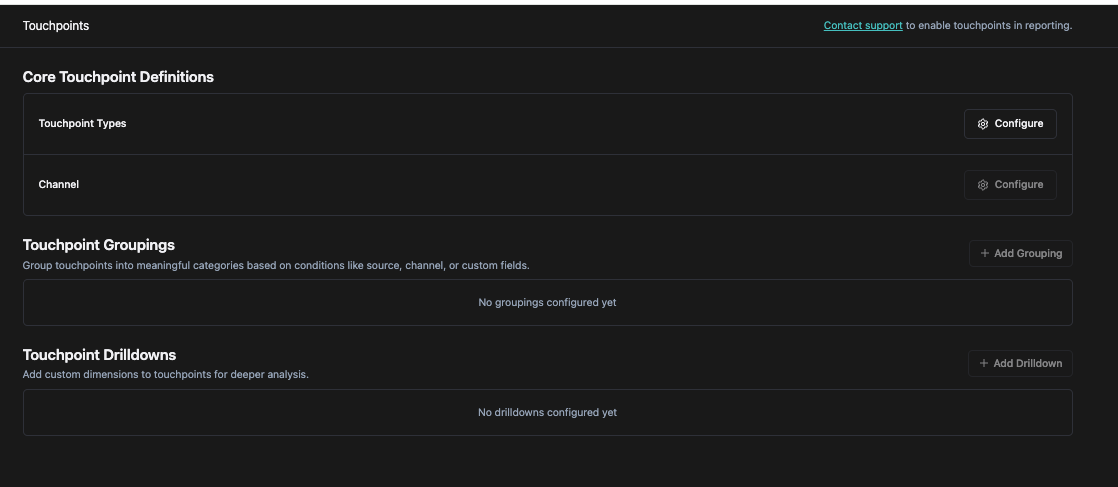
**Touchpoints** in HockeyStack represent every engagement any user or company has with your brand across marketing and sales. By clearly defining what counts as a touchpoint and how those touchpoints are grouped, you can accurately measure influence and attribute revenue, pipeline, and other KPIs to the efforts that drove them.
Touchpoints in HockeyStack are organized into four core concepts:
* **Touchpoint Types** – what counts as a touchpoint
* **Channels** – how users are directed to touchpoints
* **Touchpoint Groupings** – how you can categorize touchpoints for higher-level analysis
* **Touchpoint Drilldowns** – the most granular view of individual touchpoints flowing in
Together, these concepts give you a flexible framework to analyze performance at both a high level and a detailed level across the full buyer journey.
***
### Touchpoint Types
**Touchpoint Types** categorize every interaction your organization has with users and define consistent rules for what engagement constitutes a touchpoint.
Examples include:
* LinkedIn Ads
* Email campaigns
* Sales emails
* Webinars
* Events
* Tradeshows
These touchpoint types are used across the whole platform to visualize how customers interact with your company and used in the company view.
***
### Channels
A **Channel** is the medium or platform that brings users to your touchpoints. Channels help answer the question: *Where did this engagement come from?*
Channels can include:
* Paid Social - LinkedIn Ads
* Paid Search - Google Ads
* Paid Social - Youtube Ads
* Organic Social
* Email Marketing
> **Note:** You do not need to replicate Touchpoint Types in Channels for attribution. However, to report on touchpoints like **Events** alongside channels such as Paid Social - **LinkedIn Ads** in the same report, you can include "event" as a channel for event touchpoint type. This way you can build one report that will show attribution to Paid Social - LinkedIn Ads, Organic Search *and* events row by row.
***
### Touchpoint Groupings
**Touchpoint Groupings** represent broader collections of touchpoints used for higher-level analysis. They allow you to slice performance across larger themes or asset categories.
A common grouping is **Website Page Category**, which represents the type of destination or creative asset involved in the interaction such as blog posts, landing pages or case studies available on your website.
Groupings can also be created based on other dimensions you’ve defined in HockeyStack, allowing you to roll up performance across Channels or Touchpoint Types.
***
### Touchpoint Drilldowns
**Touchpoint Drilldowns** provide the most granular level of detail. They show what specific touchpoints are flowing in under each Touchpoint Type and what underlying values are pulled in.
Common examples include:
* Website Page
* UTM Source
* UTM Medium
* SFDC Campaign Type
* SFDC Campaign Name
***
### How Attribution Works Under the Touchpoints Model
HockeyStack’s Touchpoints attribution model first assigns credit at the **touchpoint level**, instead of at the channel or campaign level.Therefore, attribution is accurate even when channel or campaign data is missing or incomplete.
Now, channels and campaigns are simply labels added to touchpoints. They help with reporting, but they do not control how attribution is calculated.
This means attribution is **consistent, reliable, and does not change** as marketing data is updated over time.
To set up your touchpoints, please refer to [Configuring Touchpoints](/marketing-intelligence/touchpoints/configuring-touchpoints.md)
---
# Agent Instructions
This documentation is published with GitBook. GitBook is the documentation platform designed so that both humans and AI agents can read, navigate, and reason over technical content effectively. Learn more at gitbook.com.
## Querying This Documentation
If you need additional information that is not directly available in this page, you can query the documentation by asking a question.
Perform an HTTP GET request on the following URL with the `ask` and `goal` query parameters:
```
GET https://docs.hockeystack.com/marketing-intelligence/touchpoints.md?ask=&goal=
```
`ask` is the immediate question: it should be specific, self-contained, and written in natural language.
`goal` is what the user is ultimately trying to achieve, the reason they need the answer. Sharing it helps GitBook give you a better, more relevant answer. A goal is most helpful when it describes the outcome the user wants rather than restating the question. For example, with `ask=how do I create an API token`, a goal like `automate deployments from our CI pipeline` lets GitBook tailor the answer to that use case.
The response will contain a direct answer to the question and relevant excerpts and sources from the documentation.
Use this mechanism when the answer is not explicitly present in the current page, you need clarification or additional context, or you want to retrieve related documentation sections.