# Breakdowns Page release
The breakdowns and filters you’ve been using for years now have their own dedicated space in HockeyStack!
Whenever you wanted to slice and dice your data, you relied on defined properties. Now, you’ll get a dedicated home for your Breakdowns (which also work as filters!): easy to define, easy to use, and easy to manage.
#### Migration
This update will require you to migrate all defined properties you’ve been using as filters or breakdowns into the new setup. The whole process should only take a few minutes.
#### How to migrate?
1. Identify all the breakdown defined properties. These are the ones marked as “Include in filters” that are *not* touchpoints (so exclude channel, asset, etc.).
2. Rename each property you plan to migrate by adding **\[OLD]** to its name.
3. Go to the Breakdowns page and create a new breakdown for each property you're migrating.
4. Replace the old defined properties with your new breakdowns.
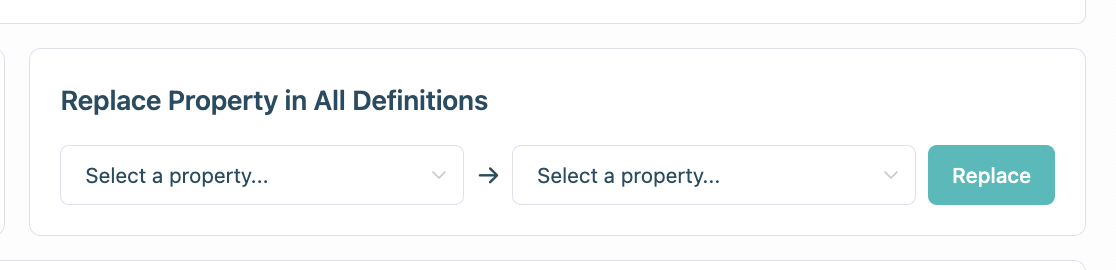
5. Navigate to **Settings → Reporting and Tracking → Replace Property in All Definitions**.
6. In the first dropdown, select the property marked with **\[OLD]** and replace it with the correct breakdown.
7. Repeat this for every property you’re migrating.
8. Once everything is replaced, delete the old defined properties.
If you run into any edge cases that can’t be mapped in the new Breakdowns view, please reach out to [**support@hockeystack.com**](mailto:support@hockeystack.com)!
**If you want to learn more about breakdowns, please see the** [breakdowns-page-release](https://docs.hockeystack.com/release-notes/breakdowns-page-release "mention") doc!